The Data Lake Sync application aligns your destination database metadata with the metadata defined in the Infor Data Lake. However, in certain cases, the metadata stored in the Infor Data Lake does not accurately reflect the actual column lengths or data types as defined in your Infor ERP system.
When metadata mismatches occur, Data Lake Sync may attempt to insert records into the destination database that exceed column length constraints. This results in insertion failures, and the following error appears in the log files:
Exception: Error Code 7: Error inserting to database table <table>: ('42000', "[42000] [Microsoft][ODBC Driver 18 for SQL Server][SQL Server]String or binary data would be truncated in table '<database>.<schema>.<table>', column '<column name>'. Truncated value: '<value>'. (2628) (SQLExecDirectW)")This error indicates that a value coming from the Infor Data Lake is too wide for the destination column.
Why This Happens
The Infor Data Lake uses file-based storage and does not enforce validation between the data and its metadata layer. If the metadata is outdated or incorrect, it may not reflect the true structure of the ERP source, leading to truncation issues during sync operations.
Resolution
To resolve this, you must ensure that the Infor Data Lake metadata is accurately updated to match the source Infor ERP schema. The method to republish or sync metadata varies depending on your specific ERP system and configuration.
Infor LN
- Login to Infor portal and access the Infor LN environment
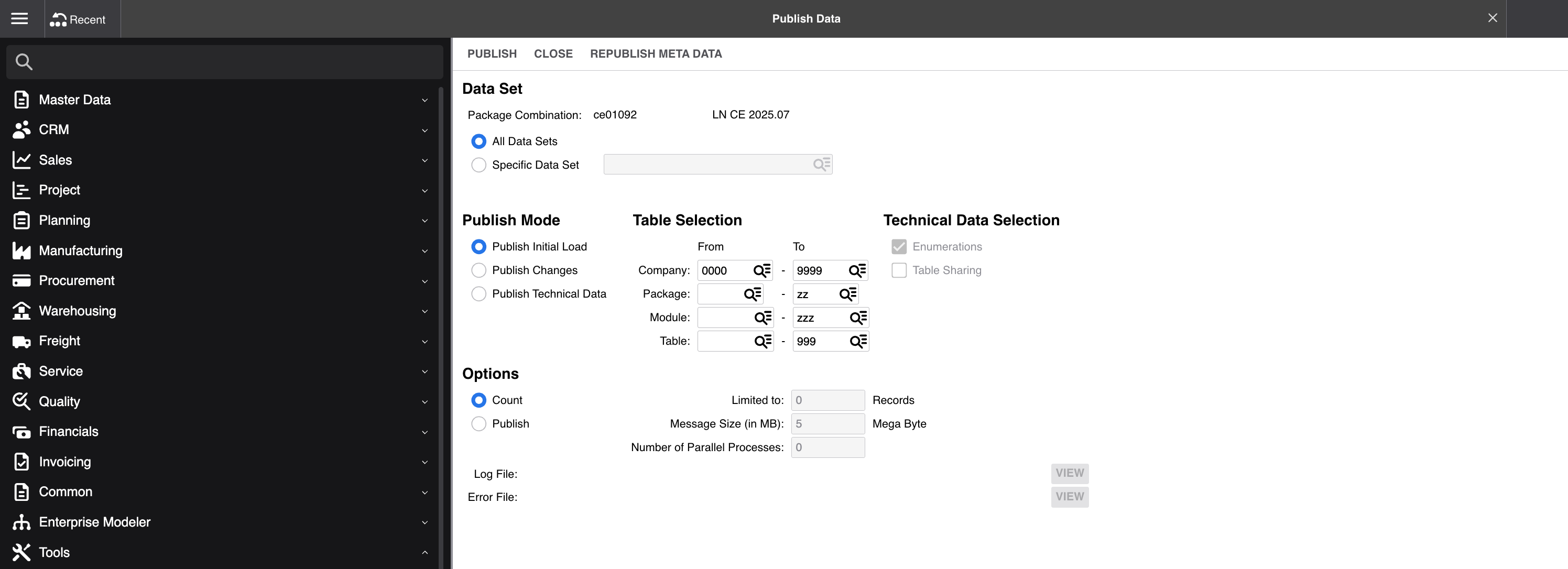
- Navigate to session ttdpm5205m000. You can also find this via the menu: Tools > Integration Tools > Data Publishing Management > Publish Data
- Click the Republish Meta Data button. This action refreshes the metadata in the Infor Data Lake to match the ERP schema, resolving the mismatch and preventing future truncation errors.
Once the Infor Data Lake metadata is in sync with the ERP, the next execution of Data Lake Sync will automatically alter the destination schema to match the updated metadata. This ensures future inserts align correctly and avoids data truncation errors.
Was this article helpful?
That’s Great!
Thank you for your feedback
Sorry! We couldn't be helpful
Thank you for your feedback
Feedback sent
We appreciate your effort and will try to fix the article